
Accidentally swiped left on someone promising and now can’t find them? On OkCupid, a pass isn’t always permanent—and there are a few reliable ways to get a second look. Below I’ll show you what actually happens after a left swipe, how to undo it, and the fastest ways to surface that profile again without turning your settings upside down.
TL;DR
- You won’t see someone you passed for about 30 days, unless you reset your passes or run out of new matches.
- Rewind instantly brings back the last profile you passed (look for the rewind icon).
- Reset Passes in Settings → Privacy → Reset lets you see passed profiles again when they fit your filters.
- Username search is gone—use filters and prompts instead.
- Interested In You (formerly “Likes You”) is now part of Premium plans.
Dude Hack Exclusive Offers



Does A Profile Disappear From Your Matches After You’ve Swiped Left?
When you pass on someone, OkCupid removes them from your current suggestions for at least 30 days. After that period—or if you run out of fresh matches—previous passes can recycle and show up again. If you don’t want that to happen, block instead of pass.
What Happens When You Swipe Left On OkCupid?
Swiping left tells OkCupid you’re not interested right now, so the profile won’t appear in DoubleTake or Discover for a while. But passes aren’t necessarily forever; as your pool thins, OkCupid may re-show people you passed, which means you often get a second chance naturally. If you’re not in the mood to wait for “eventually,” here are tools that work today.
4 Ways To Find A Profile You’ve Swiped Left On
Don’t worry, swiping left on a great match doesn’t equate to the end of your love life. From Tinder’s Rewind or Bumble’s Backtrack feature, there are ways to get a second chance across most of the apps. Here’s how to find a profile you’ve swiped left on.
If you’ve been on OkCupid long enough, you’d know there used to be two very simple ways to find a profile. The first was the DoubleTake glitch, by tapping on the button on your phone, the glitch automatically took you to the start of the batch of profiles you were looking at.
Another method was simply looking up the username. However, to protect user privacy and safety, OkCupid has discontinued the username search feature. You can no longer search up profiles with their username.
After quite some research, I can now reveal how to find a profile you’ve swiped left on.
1) Use a Rewind
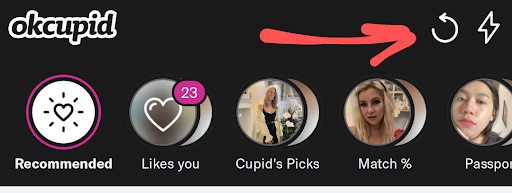
The fastest fix for an accidental pass is Rewind. Tap the rewind icon (top-right on the app; near the next profile’s name on desktop) to bring back the last profile you passed. If you’ve passed on that same profile multiple times, Rewind won’t show it again—so use it immediately after you mis-swipe.
2) Reset Your Passes
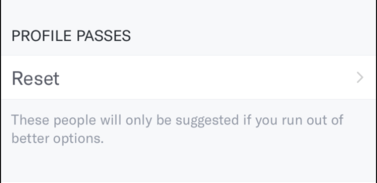
Don’t see them coming back? Head to Profile → Settings → Privacy → Reset (passes). This clears your passed list so those profiles are eligible to appear again when they match your current filters. It doesn’t guarantee they’ll be first in queue, but it reopens the door.
How To Reset Left Swipes On OkCupid (Step-By-Step)
- Open the app → Profile
- Tap Settings → Privacy
Under Passes, tap Reset → confirm
Your passes are cleared and can reenter your suggestions as you browse.
3) Adjust Your Filters (Smart Search Tips)
Think back to anything memorable: age range, location, pets, education, or a specific Match Question they answered. Loosen strict filters (or widen distance/age temporarily), then narrow strategically using details you remember. This makes it more likely they’ll show up again after you reset.
4) Check “Interested In You” (formerly “Likes You”)
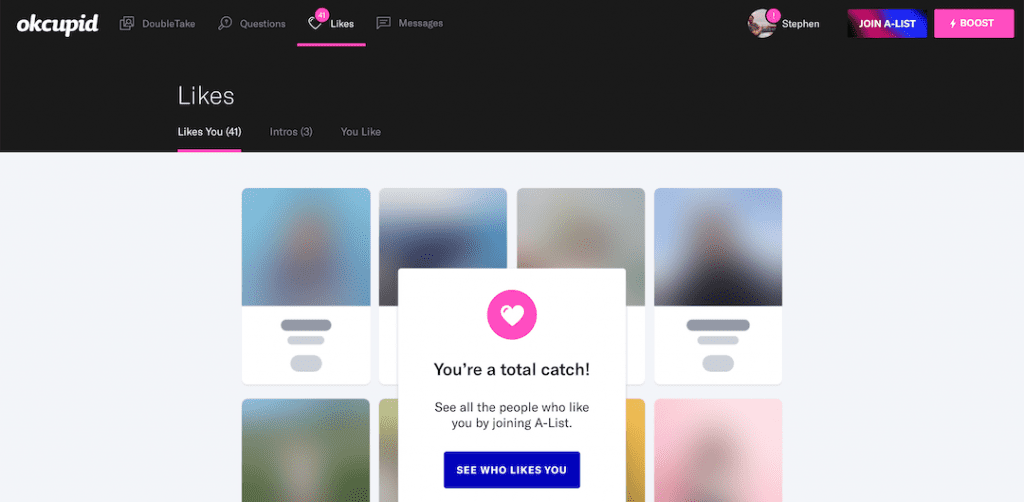
If you’re on a paid plan, browse Interested In You—the list of people who already liked or viewed you. If the person you passed liked you first, you may still find them here and match. Premium tiers include full access plus weekly SuperLikes.
I’ve Found The Profile—What Now?
Now it’s about standing out. Update your photos and prompts, then send a short, specific opener that references something on their profile—a hobby, shared value, or a Match Question. Personalized comments increase your chances of a reply.
Final Thoughts
Mis-swipes happen. Between Rewind, Reset Passes, smarter filters, and Interested In You, you’ve got several ways to fix an accidental left swipe on OkCupid. If someone never resurfaces, they may have gone inactive or changed filters—so keep moving; your next match might be one swipe away.
FAQ
Can I undo a pass on OkCupid?
Yes. Use Rewind to bring back the last person you passed. If that doesn’t help—or you passed more than once—use Reset Passes in Privacy settings.
How long until I see someone I passed again?
You typically won’t see them for about 30 days. After that, passed profiles can recycle into your suggestions unless you blocked them.
Where exactly is “Reset Passes”?
App: Profile → Settings → Privacy → Reset (under Passes). Desktop: open Privacy Settings and select Reset your passes.
Why can’t I search by username anymore?
OkCupid removed usernames and username search to improve safety and authenticity. You’ll need to rely on filters and prompts instead.
What’s “Interested In You,” and do I need Premium?
“Interested In You” (previously “See Who Likes You”) shows people who liked or viewed you. Access depends on your plan—Premium includes full visibility and weekly SuperLikes.
Does blocking or unmatching stop someone from reappearing?
Yes. Blocks don’t reset, so a blocked user won’t show up in your matches again, even after 30 days.
