
Yes, you can control who sees you on Bumble—at least to a useful extent. Bumble’s privacy tools have evolved, and as of 2025, you can manage when, where, and to whom your profile appears. Below, you’ll find the latest privacy settings and the best ways to stay visible only when you want to be.
TL;DR
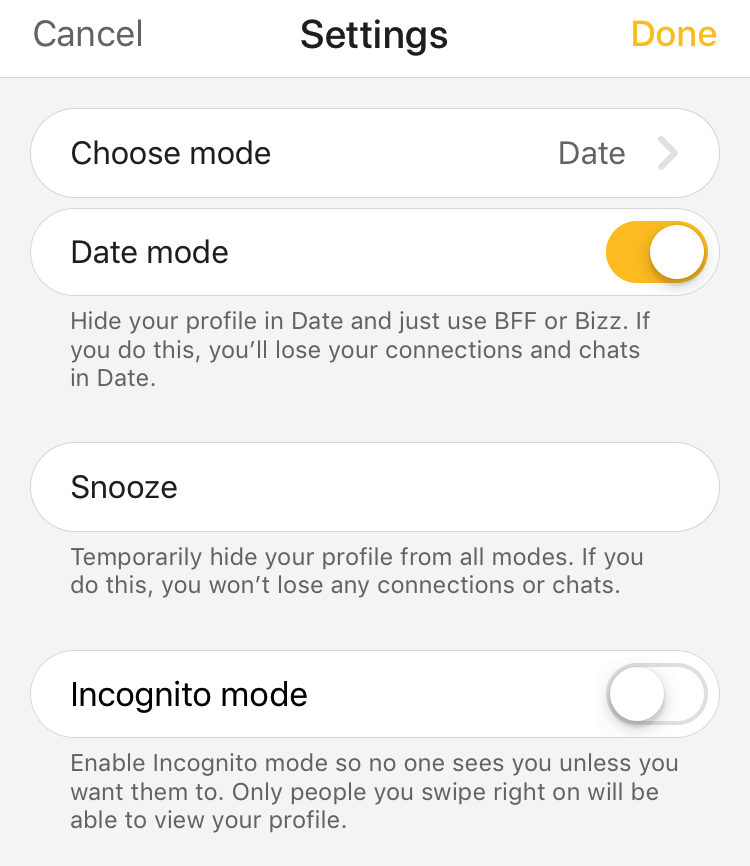
- Incognito Mode (Premium): Only people you like can see your profile.
- Snooze (Free): Hide your profile temporarily without deleting matches.
- Filters: Set age, distance, and lifestyle filters (advanced filters require Premium).
- Block & Report: Stop unwanted contact—blocked users won’t see you again.
Dude Hack Exclusive Offers

How to Control Who Sees You on Bumble
You can’t fully hack the Bumble algorithm, but you can guide it. By curating your profile and using the visibility tools intentionally, you influence who shows up—and who doesn’t. A complete, active profile reaches more compatible users, while features like Incognito Mode or Snooze narrow your exposure when needed.
Using Filters to Control Who Sees You
Filters are your first layer of control.
Free Filters: Age range and distance.
Advanced Filters (Premium): Smoking, drinking, kids, religion, politics, fitness, and more. You can only apply filters for topics listed in your own profile.
Pro tip: Update your badges (like “drinks socially” or “wants kids someday”) before applying Advanced Filters—otherwise, they won’t activate.
Using Incognito Mode on Bumble
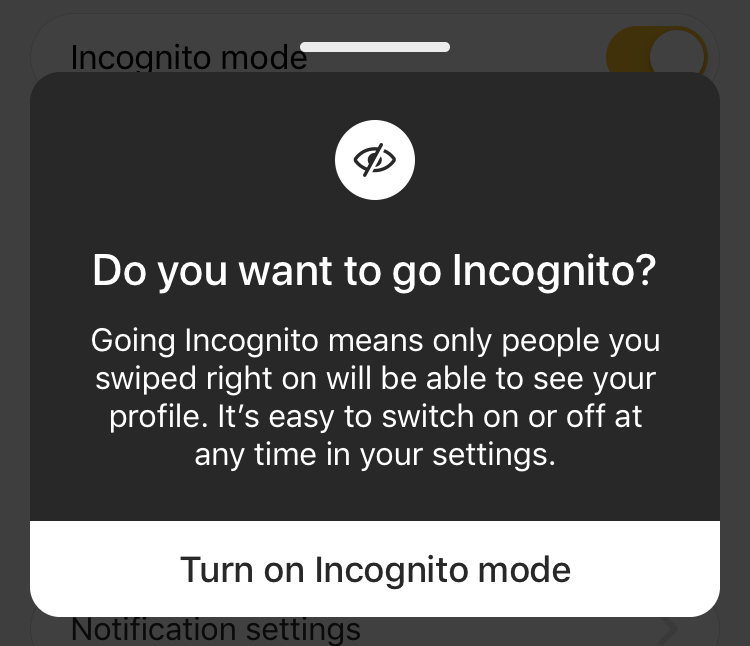
Incognito Mode is available to Premium subscribers. Once enabled, your profile is hidden from everyone except people you’ve liked. It’s perfect for browsing quietly, avoiding awkward encounters, or keeping a low profile while still using the app.
Using Snooze Mode on Bumble
If you need a break, use Snooze. It hides your profile from new users while keeping your existing matches and chats active. You can choose to snooze for 24 hours, 72 hours, a week, or indefinitely, then turn it off whenever you’re ready to reappear.
Blocking and Privacy on Bumble
Blocking lets you remove someone completely—no notifications, no traces. Once blocked, they can’t find or message you again, and the action can’t be undone. Some users have reported seeing blocked profiles again, but Bumble states that blocked or hidden users shouldn’t reappear. If that ever happens, take a screenshot and report it to support.
Smart Privacy Combos
- Low-exposure browsing: Use Premium + Incognito Mode to stay invisible unless you like someone.
- Tight compatibility: Fill out all badges, enable matching Advanced Filters, and keep your preferences narrow.
Quiet weekends: Snooze for a few days to take a break without losing matches.
FAQ
Can I hide my Bumble profile from one person (like an ex or coworker)?
Not directly. Use Incognito Mode to be visible only to people you like or block them if you encounter them.
Do people know if I block them?
No, blocking is private. It removes them from your matches and prevents future contact permanently.
What’s the difference between Snooze and Incognito?
Snooze hides your profile from everyone temporarily, while Incognito lets you keep swiping but hides you from anyone you haven’t liked yet.
Are Advanced Filters free?
Only age and distance are free. All other filters, such as lifestyle or politics, require Bumble Premium.
I blocked someone but think I saw them again—what should I do?
That shouldn’t happen. Screenshot their profile and report it directly to Bumble Support.
Does profile quality affect visibility?
Yes. A complete, active profile with good photos and filled-out prompts performs better in the algorithm and attracts more compatible matches.
