

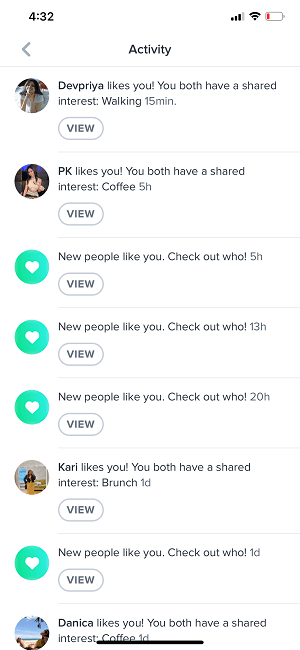
Tinder’s Activity is the app’s live notifications hub — your central spot for seeing likes, matches, and updates without leaving the app. Accessible via the bell icon, it keeps your dating life organized and ensures you never miss a connection.
TL;DR
- Activity = Tinder’s notification center (bell icon) showing likes, matches, and account alerts.
- Gold/Platinum users still see “Who Likes You.” Free users see that someone liked them but not who.
- Not the old Feed — that was retired in 2020 and isn’t coming back.
- 2025 updates: Tinder revamped Explore tiles with clearer dating intents (Serious Dater, Non-Monogamy).
- New in 2025: Tinder launched Double Date, letting you match with other pairs alongside a friend.

What Is Tinder Activity?
The Activity section in Tinder is your in-app notifications feed. It compiles likes, matches, and alerts that you’d otherwise see through phone notifications, but organizes them directly inside the app. You can adjust your alert preferences in Settings → Notifications to manage push or email updates.
If you have Tinder Gold or Platinum, you can still see who liked you via the Who Likes You tab. Free users can only see that someone liked them — plus shared interests or details — and must match to start chatting.
Dude Hack Exclusive Offers



How Does Tinder Activity Work?
Activity updates in real time, collecting all your recent actions, including new likes, matches, or app changes. Tap the bell icon at the top-right corner of Tinder to view it.
Keep in mind that your Recently Active status is separate. You can hide your activity status anytime under Settings → Recently Active Status if you prefer more privacy.
Is Tinder Activity the Same as Tinder Feed?
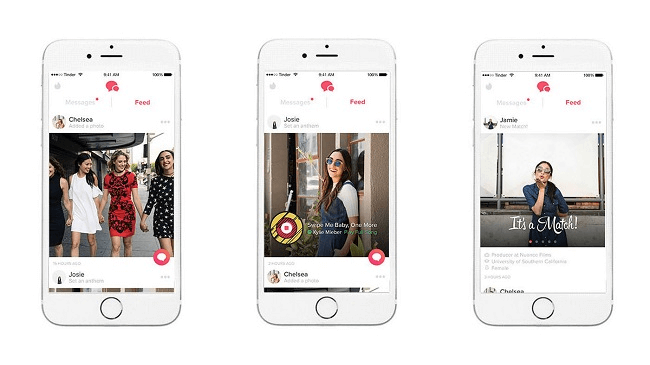
No — Activity and Feed are different. The old Tinder Feed (which showed updates from your matches like new photos or Spotify changes) was discontinued in 2020. Activity only displays your own incoming notifications and app events, not social updates from others.
When Was Tinder Activity Introduced?
The Activity tab started rolling out in early 2022. Since then, Tinder has expanded its in-app features to improve intent-based dating experiences. In 2025, the Explore section received a major refresh with new intent tiles such as Serious Dater and Non-Monogamy, giving users more control over who they meet.

Final Thoughts
Tinder’s Activity feature simplifies how you stay connected — all your likes, matches, and updates in one place. It’s a cleaner way to track engagement and stay responsive. With ongoing 2025 updates like Explore’s new categories and the social Double Date feature, Tinder continues to evolve toward more meaningful, flexible ways to meet people.
FAQ
Where do I find Activity on Tinder?
Tap the bell icon in the top-right corner of Tinder’s home screen. That’s your Activity tab, where you’ll find all in-app notifications.
Can others see when I’m active?
Only if you enable it. You can hide your Recently Active status by turning it off in Settings → Recently Active Status.
Is Activity available to everyone?
Yes, but certain new tiles or features inside Activity may roll out gradually by region. Tinder often tests new features before global release.
Did Tinder bring back the old Feed?
No. The Tinder Feed was discontinued in 2020. Activity serves a different purpose — it’s purely for your personal notifications.
What’s new in Tinder for 2025?
Tinder added Explore tiles for specific dating intents (like Serious Dater and Non-Monogamy) and introduced Double Date, where you and a friend can match with other pairs.
Does Activity show who viewed my profile?
No, Tinder doesn’t display profile views. Activity only shows likes, matches, and notifications related to your own account actions.
