
If you’ve ever blurted “You too!” when the waiter says “Enjoy your meal,” you know the urge to vanish. You can’t disappear mid-date—but on Tinder, you actually can go invisible in a few useful ways. Here’s how the trick works (and when it doesn’t).
TL;DR
- People you liked before hiding may still match you later.
- Turn off Discovery to stop appearing to new people while keeping existing chats.
- Use Incognito Mode (a premium feature) to let only people you like see your profile.
- Hide from specific people using Block Contacts or Block Profile.
- Settings may show up as Enable Discovery or Show me on Tinder.

Dude Hack Exclusive Offers



Can You Go Invisible on Tinder?
The veil of anonymity can be empowering—and tempting on dating apps. Can you go invisible on Tinder? Yes, in a couple of ways.
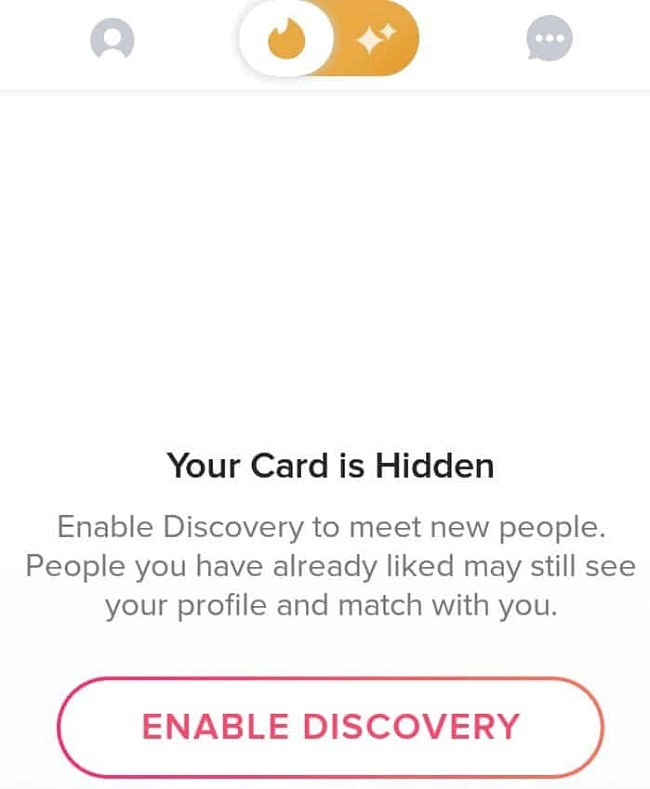
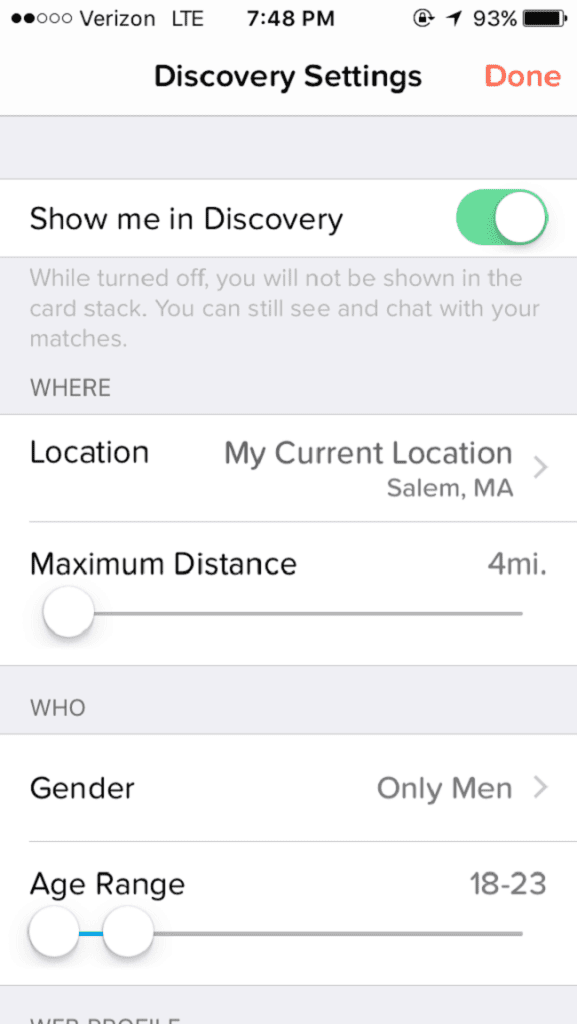
- Turn off Discovery (“Show me on Tinder”) to stop appearing to new people entirely. You’ll still see and message existing matches, but you can’t browse new profiles while hidden. In Settings, look for Discovery → toggle Enable Discovery off (sometimes labeled Show me on Tinder).
- Use Incognito Mode if you want to keep swiping but limit who can see you. When Incognito is on, only people you’ve already liked will see your profile in their recommendations. Note: Incognito is a premium feature (Tinder+, Gold, Premium).
So yes, you can “go invisible,” but the experience changes. With Discovery off you can’t find new matches; with Incognito, you can still browse—just on your terms.
How to go invisible (three quick options)
- Hide completely (no browsing): Profile → Settings → Discovery → Enable Discovery OFF (Show me on Tinder OFF).
- Browse privately (premium): Profile → Settings → Incognito Mode ON. Only people you like will see you.
Reduce who sees you (targeted): Use Block Contacts or Block Profile to avoid specific people.
Congrats—you’re “invisible.” What can you do now? With Discovery off: keep chatting with current matches, and people you liked earlier may still match you later. With Incognito: swipe as usual, but only your likes can see you.
Why Do People Want to Be Invisible on Tinder?
Invisibility won’t let you rob banks, but it can save you from awkward run-ins. Reasons include:
- Taking a breather from new matches—swipe fatigue is real.
- Avoiding an ex, coworker, or nosy friend.
- Keeping things low-key while you update your profile.
- Managing too many conversations at once.
- Enhancing privacy and control over who sees you.
If you’re totally hidden, you’re not really “using” Tinder beyond chatting. Incognito Mode is often the perfect middle ground—it lets you stay private while still exploring potential matches.

Can You Hide Your Profile from Someone Specific on Tinder?
Sometimes online dating is cat-and-mouse. Want to avoid specific people?
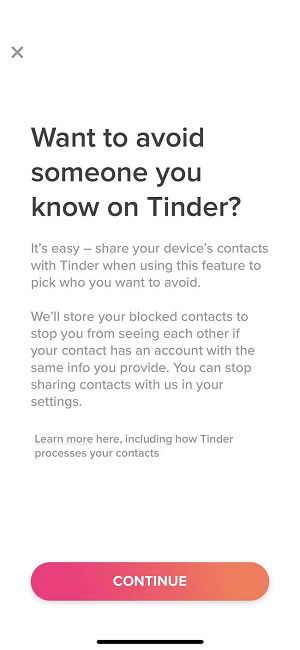
Block Contacts: Share your phone’s contacts in Settings → Block Contacts and select who you don’t want to see (and who shouldn’t see you). Works best if they use Tinder with the same phone number or email. You can unblock anytime.
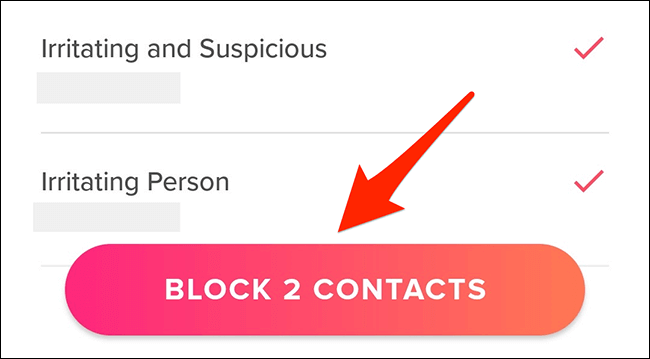
Block Profile (pre-match): If a suggested card pops up and you’d rather not cross paths again (boss, ex), you can block that profile so it won’t appear in your deck.
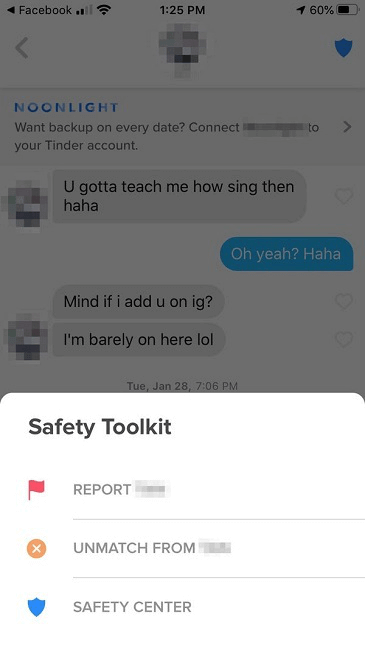
Unmatch/Block (post-match): In a chat, tap the Safety Toolkit to unmatch and optionally report. They won’t be notified and you’ll be removed from each other’s matches.
These methods don’t guarantee total invisibility if someone creates a new account, but they greatly reduce awkward encounters.
Can I Find Someone on Tinder If They Turned Off “Discovery”?
If someone disables Discovery, they won’t appear as a new recommendation. However, if they liked you before hiding, you can still match if you like them back later. Previous matches remain in your messages regardless. If they’re using Incognito Mode, you’ll only see them if they’ve liked you first.
Final Thoughts
There are plenty of reasons to go invisible—or to selectively block who sees you. These tools give you more control and can help you feel safer. But if you’re hiding forever, you’re not here to meet people. When you’re ready, step back into the world of swiping. And for a head start, get my “Tinder Hacked” guide to master the art of Tinder. Not sure Tinder’s your vibe? Try my dating app quiz to find the right match for your love life.

FAQ
Is Incognito Mode free?
No. Incognito is a premium feature available with Tinder+, Gold, and Premium plans. It lets only people you’ve liked see you in their recommendations.
What’s the difference between “Discovery off” and Incognito?
With Discovery off, you’re hidden from new people and can’t browse recommendations. With Incognito, you can still swipe—but only your likes can see you.
Why do I see different labels like “Enable Discovery” vs. “Show me on Tinder”?
Tinder’s settings language varies by region and app version. You’ll usually find the toggle under Discovery or Show me on Tinder in Settings.
Can I hide from just my ex or coworkers without hiding from everyone?
Yes. Use Block Contacts to hide from people in your phone, Block Profile on suggested cards, or unmatch/block in chats.
If I turn off Discovery, can I still get new matches?
Possibly. People you liked before turning it off may still see and like you back, creating a new match later. You can always chat with existing matches.
Does blocking contacts upload my entire address book to Tinder?
No. Tinder lets you choose which contacts to share for blocking. You can disconnect at any time—the feature’s designed to prevent mutual visibility.
