
Worried your Bumble profile is showing up for the wrong people? You’ve got options. Between Incognito Mode, Snooze, and in-app blocking, you can control who sees you and when—without deleting your account. Just remember: dating apps aren’t fully confidential, so share thoughtfully.
TL;DR
- Keep personal details minimal and review Bumble’s privacy policy regularly.
- Incognito Mode (Premium) hides your profile from everyone unless you like them first.
- Snooze Mode (free) pauses your profile for 24h, 72h, 1 week, or indefinitely, and lets you set an away status.
- Block & Report specific profiles directly from their profile or chat.
- Screenshots aren’t notified—post only what you’re comfortable sharing.
Can You Be Private on Bumble?
From dating preferences to life goals, your Bumble profile can feel personal. Can you be private on Bumble? To an extent, yes. Incognito Mode lets you control visibility—your profile only appears to people you’ve liked first. This feature is included with Bumble Premium or Premium+.
If by “private” you mean controlling what you show and who sees it—you can, but only within the limits of a social discovery app. Bumble still processes your data, so keep details limited and check the app’s privacy policy.
Bumble knows privacy matters. You now have Snooze Mode for taking breaks and Incognito Mode for tighter visibility control.
Dude Hack Exclusive Offers


What Is Bumble Incognito Mode?
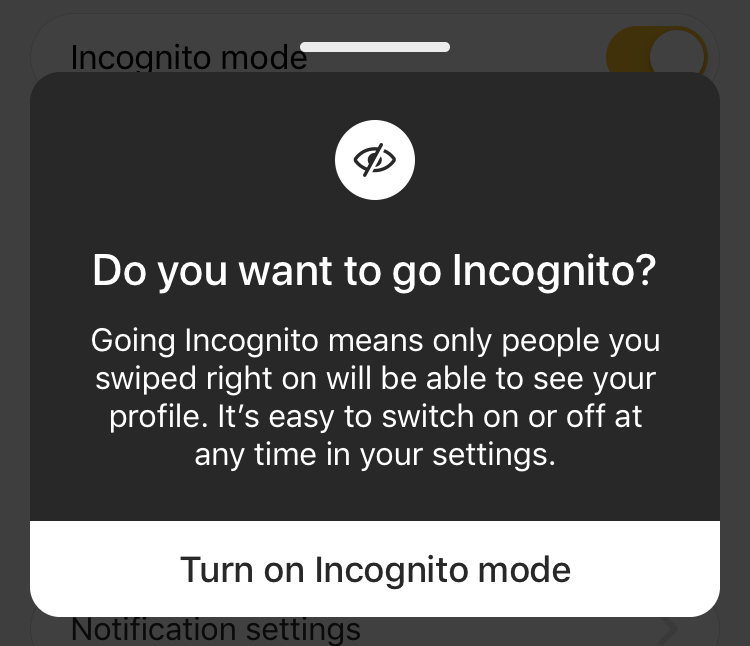
Incognito Mode hides your profile from everyone unless you swipe right on them. You can turn it on by going to Profile → Settings → Incognito Mode. Once enabled, you’ll only appear to people you’ve liked, giving you total control over who sees your profile. It’s one of the most effective privacy tools on any major dating app, though it’s part of Bumble Premium.
How to Use Incognito Mode
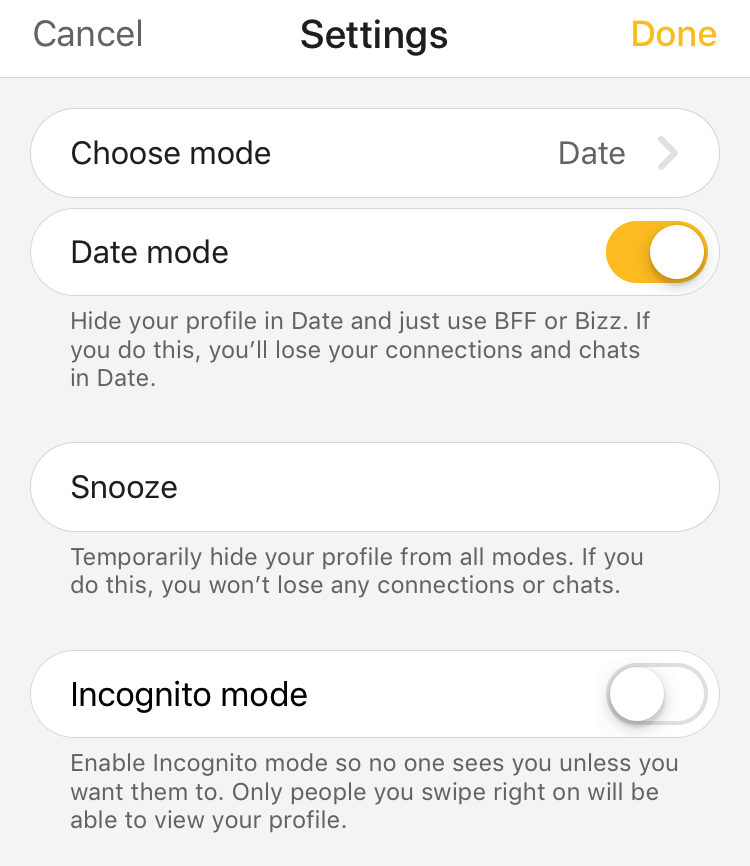
- Open Bumble
- Tap your Profile icon
- Tap the Settings gear
Toggle Incognito Mode on (you’ll be prompted to upgrade if needed)
When it’s on, only people you like will see you. For better results while staying private, swipe right strategically.
What Is Bumble Snooze?
Feeling burnt out? Snooze Mode pauses your account temporarily. While snoozed, you won’t appear to new matches. You can choose from 24 hours, 72 hours, a week, or indefinitely, and optionally display a status like “Taking a break” or “Traveling.”
Snooze is free and available in Settings → Snooze. You’ll keep your matches and chats, though inactive matches might expire during your break.
Can My Friends See Me on Bumble?
If your friends are swiping too and you’re not using Incognito or Snooze, they could see your profile. You’ll only match if you both swipe right, but if that’s uncomfortable, turn on Incognito or Snooze—or block their profile when it appears.
Can You Hide Your Bumble Profile From a Specific Person?
You can’t upload your contact list to pre-block people, but you can block anyone you see.
To block: open their profile or chat → tap ⋯ → Block and Report → choose a reason (even “Not interested” works).
This stops them from seeing you again and removes the chat if you had one. For proactive privacy, Incognito Mode ensures people don’t see you first.
Is Bumble Confidential?
No dating app is fully confidential. Profiles and chats can be screenshotted, and Bumble doesn’t alert users when that happens. Keep your real-life details private—avoid sharing your exact workplace or address—and move conversations off the app only when you’re comfortable. Reviewing Bumble’s privacy policy helps you understand what data’s collected and how it’s used.
Is Your Bumble Profile Public?
Within the app, yes—your profile is visible to others based on your settings. Incognito restricts visibility, while Snooze pauses it. Since Bumble doesn’t notify for screenshots, post only what you’re fine with being saved or shared.
Can You Control Who Sees You on Bumble?
- Full control: Incognito Mode lets only people you’ve liked see you.
Partial control: Filters by age, distance, and interests, plus unmatch or block features.
Bumble gives decent privacy control, but not total invisibility—choose your settings wisely.
Final Thoughts
If privacy’s your priority, use the tools available: Incognito Mode for control, Snooze Mode for breaks, and Block & Report for individuals. The trade-off is reach—fewer people will see you—but it’s worth it if you value discretion. Keep your bio simple, photos intentional, and enjoy a more private Bumble experience.
FAQ
What’s the difference between Incognito and Snooze?
Incognito (Premium) hides you from everyone unless you like them first. Snooze (free) pauses your account for a set time so you stop appearing to new users.
Can I block someone I haven’t matched with?
Yes. Open their profile, tap ⋯, then Block and Report. You can pick “Not interested” to block without flagging misconduct.
Does Bumble notify screenshots of profiles or chats?
No. Bumble doesn’t send alerts when someone takes screenshots, so always share carefully.
Will my matches know I’m on Snooze?
Only if you set an away status. Otherwise, they won’t be notified, though some inactive matches can expire during your break.
Is Incognito available on all subscriptions?
Incognito Mode is included with Bumble Premium and Premium+ plans. You can enable it anytime from Settings after upgrading.
Can I stop coworkers or an ex from ever seeing me?
There’s no full contact-blocking feature. Use Incognito to stay hidden until you swipe right, and block any profile you encounter manually.
