
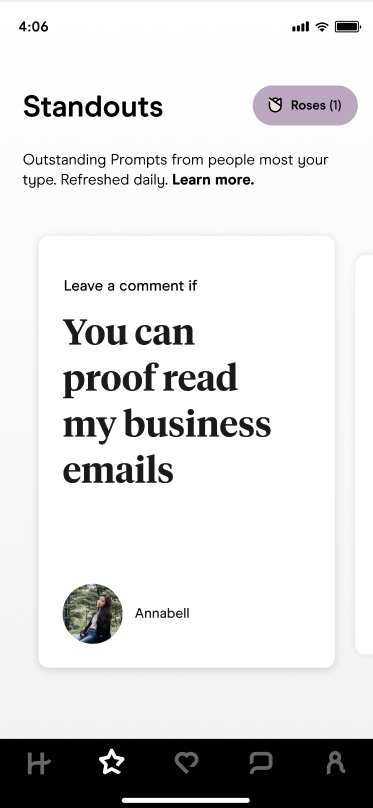
Hinge Standouts are a curated daily batch of high-attention profiles tailored to your preferences. You’ll find them behind the ⭐️ icon—and you can only reach out with a Rose. This guide explains what Standouts are, how they’re chosen, how Roses work in 2025, and smart ways to make the most of them.
TL;DR
- Standouts are a small, daily list of algorithm-picked profiles that align with your preferences
- You can only send Roses in Standouts; a Rose puts you at the top of their Likes You list
- You get one free Rose per week, and it doesn’t roll over
- Some Standouts may later appear in Discover, but not always
- Expect about 10 fresh Standouts per day, depending on your area
Dude Hack Exclusive Offers



What Are Hinge Standouts?
Standouts are Hinge’s way of showing you the best profiles for you—based on your preferences and who’s attracting attention. You’ll find them under the star icon, and they refresh daily with a small selection, usually around ten. This keeps browsing quick and focused without endless scrolling.
Are Hinge Standouts Mutual?
No. Just because someone appears in your Standouts doesn’t mean you appear in theirs. Hinge curates each Standouts list individually based on compatibility, popularity, and activity patterns, so overlap happens but isn’t guaranteed.
How Does Hinge Choose People For Standouts?
Hinge selects profiles that are getting high engagement—lots of likes or comments—and filters them through your personal preferences. Essentially, it’s a mix of popularity and compatibility. The goal is to surface profiles most likely to catch your attention quickly.
Why Are Hinge Standouts So Much Better?
They’re better because they highlight active, high-quality profiles that already attract attention. These users often have well-written prompts, engaging photos, and higher match rates. It’s Hinge’s way of saving you time by focusing on profiles that stand out naturally.
Are Hinge Standouts The Same For Everyone
No. Everyone’s Standouts feed is personalized. Two people in the same city may see completely different profiles depending on their preferences, swiping behavior, and in-app activity.
How Do You Know If You’re On Standouts On Hinge?
There’s no official notification or badge. However, if you suddenly get more Roses than usual, that’s a good sign you’ve appeared in other people’s Standouts. Hinge keeps this feature low-key to encourage authentic engagement.
Do Hinge Standouts Show Up In The Regular Feed?
Sometimes—but not always. Some Standouts might appear later in the Discover feed, but there’s no guarantee. If someone catches your eye, it’s best to act while they’re still visible in your Standouts list.
What Are The Roses On Hinge?
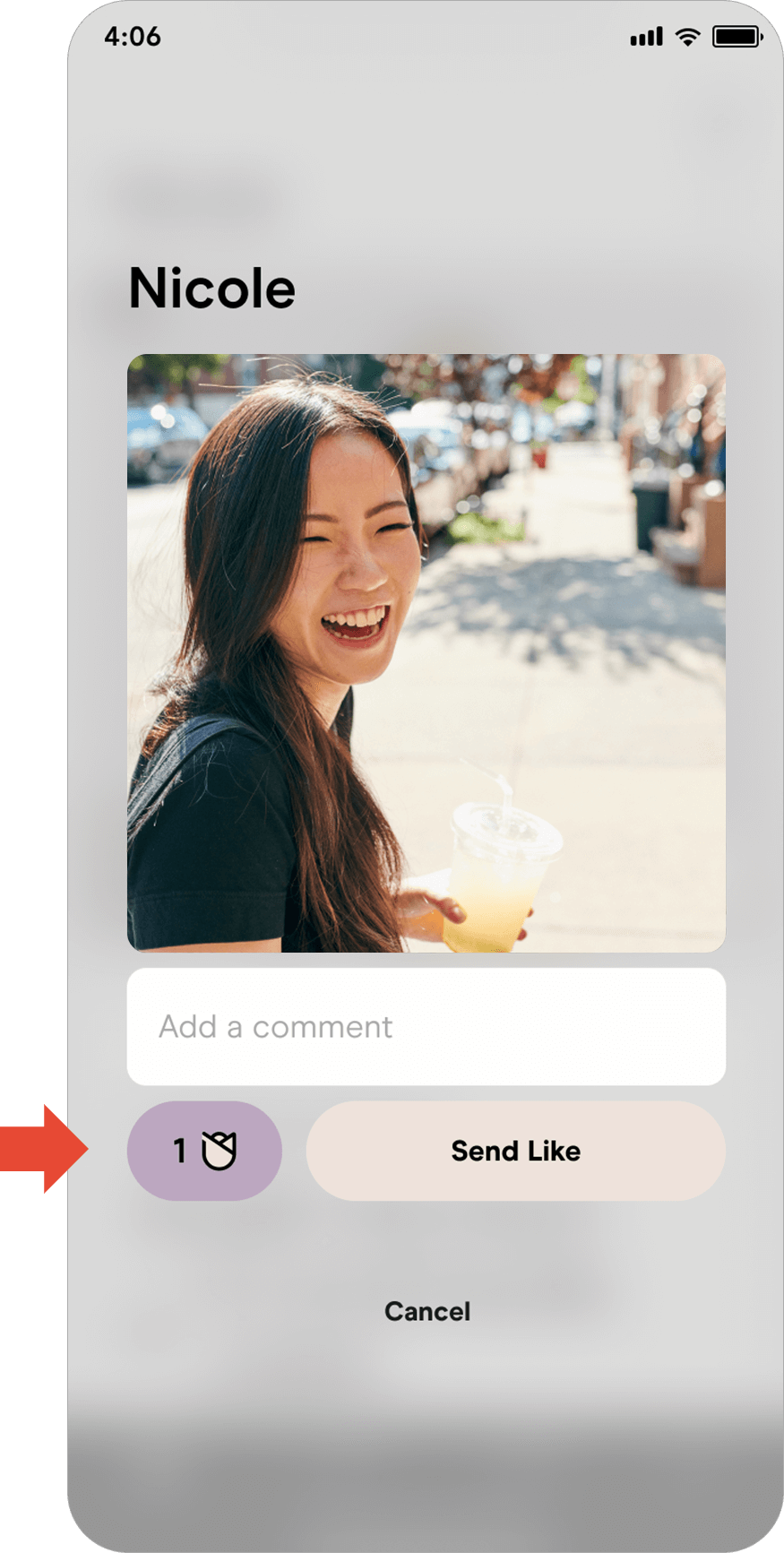
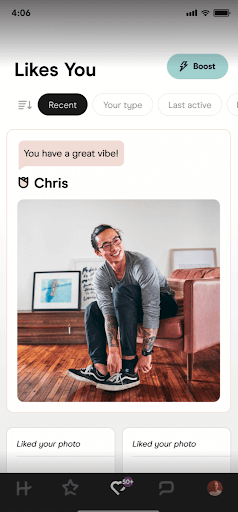
Roses are premium Likes that stand out. You can only send Roses to people in the Standouts tab. When you send a Rose, you move to the top of that person’s Likes You section, increasing your visibility and chances of a match. You get one free Rose each week, which doesn’t roll over, and you can purchase more if you want extra.
When To Send Your Hinge Rose
Since Standouts refresh daily and free Roses don’t accumulate, timing matters. Hold onto your Rose until a truly exceptional profile appears, or use it right away on someone who grabs your attention. Waiting for them to show up in your Discover feed isn’t always worth the risk—they may never appear again.
How Do You Send A Like Instead Of A Rose In Standouts On Hinge?
You can’t. The Standouts tab only accepts Roses. If you want to send a regular Like, you’ll need to find the profile in Discover. You can still send Roses in Discover if you’d like, but they’re optional there.
Do People Know If You Send A Rose On Hinge?
Yes. Roses are visually marked and appear at the top of someone’s Likes You list. It doesn’t guarantee a match, but it does make you stand out from regular Likes and often leads to faster responses.
The Verdict On Hinge Standouts
Hinge Standouts are a shortcut to higher-quality matches. They help you focus on standout profiles while giving your Rose extra weight. Just remember—Roses can get pricey, so use your free weekly one wisely. And if you want to appear in others’ Standouts, optimize your prompts, photos, and overall engagement.
If you’re ready to plant a few Roses and grow your chances of matching, now’s a great time to polish your Hinge profile. My free 6-Step Tinder Tune-Up works across apps and can help elevate your photos and prompts for better results.
FAQ
How many Standouts do I get per day?
Hinge typically refreshes your Standouts with around 10 profiles per day, though the number can vary depending on your city and app activity.
Do free Roses roll over if I don’t use them?
No. You get one free Rose every week, and if you don’t use it before the next reset, it disappears.
Can I send Roses outside the Standouts tab?
Yes. You can send Roses from the Discover section too, but in Standouts, a Rose is the only way to like someone.
Will a Standout definitely appear in my regular Discover feed later?
Not necessarily. Some may reappear, but most don’t. If you like someone in Standouts, send your Rose before they disappear.
What’s the difference between Standouts and Enhanced Recommendations?
Standouts show trending, high-engagement profiles; Enhanced Recommendations surface strong matches based on mutual compatibility within Discover.
Do Standouts mean the other person sees me as a Standout too?
No. Standouts aren’t mutual. Each user’s feed is individually tailored, so you may appear in someone’s Standouts even if they don’t appear in yours.
