
You match. You chat. You bond over Scoop the dog and a questionable TV finale… and then poof — the conversation vanishes. Here’s what that usually means, how to fix app glitches, and what you can (and can’t) do about it — fast.

TL;DR
- One or a few chats disappearing usually means they unmatched you or deleted their account.
- Unmatching permanently removes the conversation for both people; you can’t get it back.
- If all your matches vanish at once, it’s likely a technical glitch — log out and back in, or reinstall the app.
- Deleting the app doesn’t delete a profile; deleting the account wipes matches and messages.
- Bans also remove chats; there’s now an Appeals Center if someone was banned in error.
Dude Hack Exclusive Offers



Why The Conversation Vanished
They unmatched you on purpose. It happens. When someone unmatches, the chat disappears from both your match lists — permanently. There’s no notification, they’ll just be gone.
They unmatched by accident. Uh oh! Accidental unmatches happen. Maybe it’s the meet-cute for a romcom… or the start of a true-crime pilot. Best to let that one go.
You accidentally unmatched them. A slip of the thumb, perhaps. Or a late-night decision you don’t even remember making. Either way, unmatching deletes the thread for both people and can’t be reversed.
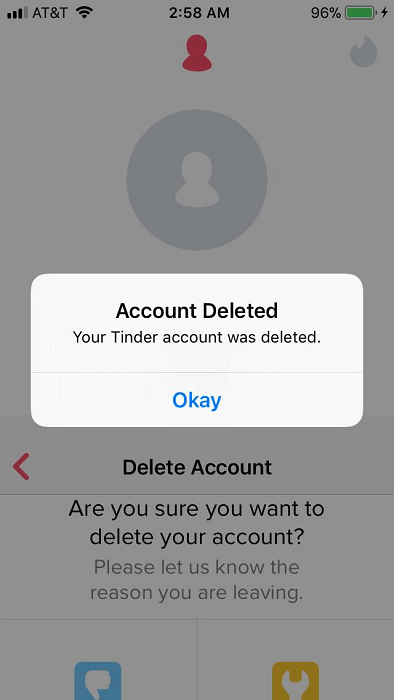
They deleted their account. When someone deletes their account (not just the app), their matches and messages are removed. If they later return to Tinder, you might see them again in Discovery.
They were banned. If Tinder bans a user for violating policies, their profile — and any chats with them — vanish. There’s an official Appeals Center for bans issued in error.
A glitch. If many or all conversations disappear at once, it’s usually technical. Log out and back in (Profile icon → Settings → Logout), or reinstall the app; Tinder recommends these steps for match-list weirdness.

How Do You Avoid A Conversation Disappearing On Tinder?
For things like bans or accidental unmatches, there’s not much you can do after the fact. If it happens, take a breath and move on.
But you can reduce avoidable vanishes:
- Keep things flowing so your match doesn’t lose interest and unmatch on a whim.
- Don’t assume deleting the app “hides” you — your profile stays active unless you pause or delete your account in Settings.
- If your entire match list looks off, try the official fixes first: log out/in, then reinstall to ensure you’re on the latest version. If you’re looking for a comprehensive guide to making the most of every match on Tinder, download Tinder Hacked. This full and crucially ‘un-douchey’ guide to truly understanding the app offers advice on everything for guys or girls:
- Learn how to send the perfect opening message
- Craft the ideal bio to grab, and keep, their attention
- Plan the perfect date once you finally take things offline.
It’ll be the best… um… free you ever spend.

Why Did A Tinder Conversation Disappear Then Reappear?
Sometimes matches do the hokey-cokey. Two common reasons:
- They deleted their account, then came back. When someone returns, Tinder may surface them to you again in Discovery.
Temporary app issues. If your whole list flickers in and out, it’s typically server sync or cache trouble — logging out/in often restores everything.
To log out: open Tinder → tap the profile icon → Settings → scroll down to Logout. To refresh fully, delete and reinstall the app afterward.
Can You Tell Whether Someone Unmatched You Or Deleted Their Tinder?
Short answer: not really.
If only one or a few matches disappear, the usual cause is either an unmatch or an account deletion — both remove the thread. If they later rejoin Tinder, you may come across them again in Discovery, but you won’t get your chat history back either way.
Either way, try not to dwell on it. They might have been great, and the conversation might have been fun, and yes, Scoop was a cute dog. But there are a ton of other users out there on Tinder just waiting for your solid-gold sense of humor, and your insights into that new show on Netflix.
Missed chances happen, and making yourself feel bad won’t achieve anything apart from bumming you out and making it harder to find that next great connection.
Either way, try not to dwell on it.

Final Thoughts
There are a lot of reasons a conversation on Tinder might disappear. Some don’t reflect greatly on you, some won’t reflect greatly on your match — and sometimes it’s just the app having a moment. If your chats have vanished too damn often, it might be time to try a different app for a while — or refresh your approach and get back out there.

FAQs
Does deleting the Tinder app delete my profile or chats?
No. Deleting the app doesn’t remove your profile; you’ll still appear on Tinder unless you pause or delete your account in Settings.
Can I recover a disappeared conversation?
No. You can’t delete individual messages, and once a match is ended or an account is deleted, the entire conversation is gone for good.
All my matches vanished at once — what should I do?
That’s usually a technical issue. Log out (Profile → Settings → Logout), then log back in; if needed, reinstall the app to ensure you’re on the latest version.
Can I tell for sure if someone unmatched me vs. deleted their account?
Not definitively. Both actions remove them from your matches; if they return to Tinder later, you might see them in Discovery again — but your old chat won’t come back.
What if someone disappeared because they were banned?
Banned accounts are removed, which also removes your chat. Tinder now provides an Appeals Center for bans issued in error (for the banned user to use).
