
So… you want to disappear from Zoosk — either for a breather or for good. Here’s the short version: you can pause your profile, deactivate it from web or Android, and on iOS there’s a Delete Account option. If you need a permanent wipe beyond deactivation (including data removal), you can request account deletion from Zoosk support and cancel any app-store subscriptions separately so billing actually stops.
TL;DR
- Pause hides your profile temporarily — easy to reverse.
- Deactivate (web/Android) removes your profile from view; you can log in later to reactivate.
- Delete (iOS app) removes your profile, messages, coins, and any remaining benefits.
- Permanent deletion requires contacting Zoosk Support for full data removal.
- Cancel subscriptions through Zoosk, Apple, or Google to stop billing.
Dude Hack Exclusive Offers


Taking a Temporary Break (Pausing Your Account)
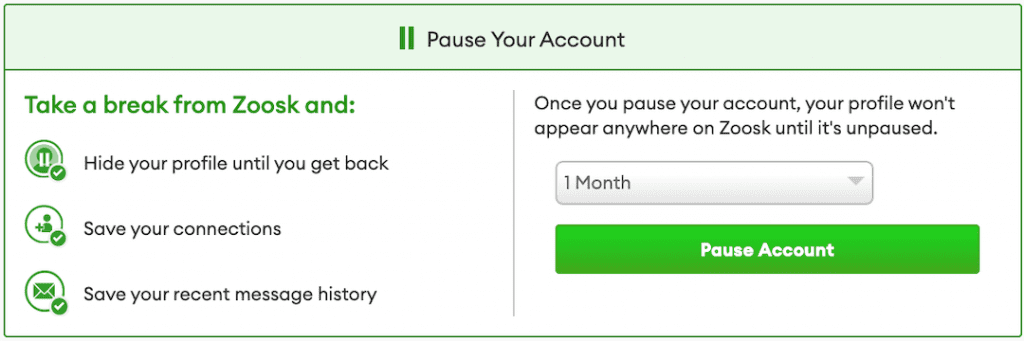
If you’re just stepping away, Pause Account keeps everything intact and out of sight.
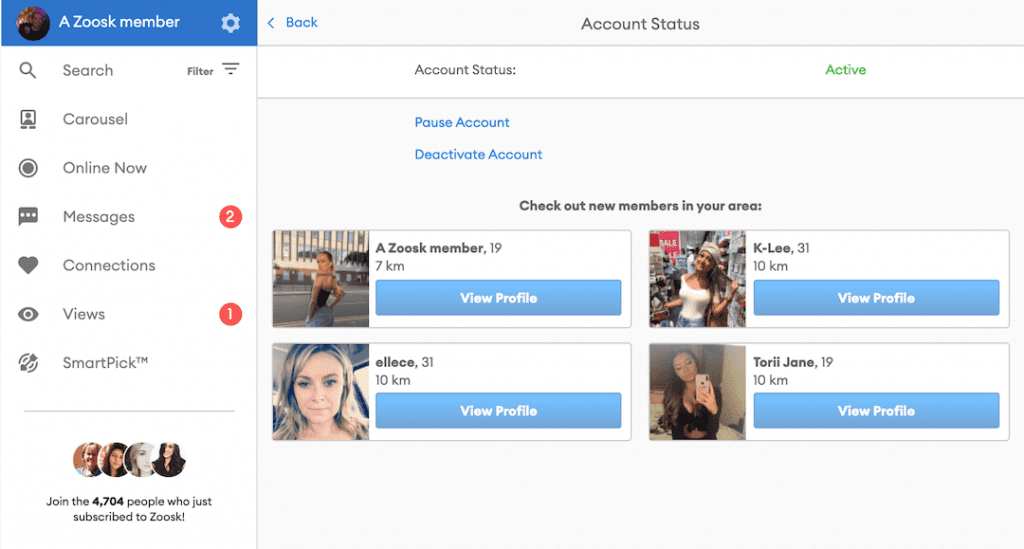
From the app (iOS/Android): Open Zoosk → menu (≡) → gear icon → Account → Account Status → Pause Account, then choose a duration (including “until I come back”).
What happens when you pause: your profile stops appearing to others; you can unpause anytime and pick up where you left off.
Permanent Removal (Deactivate vs. Delete)
Zoosk uses a couple of terms here:
Deactivate (web & Android):
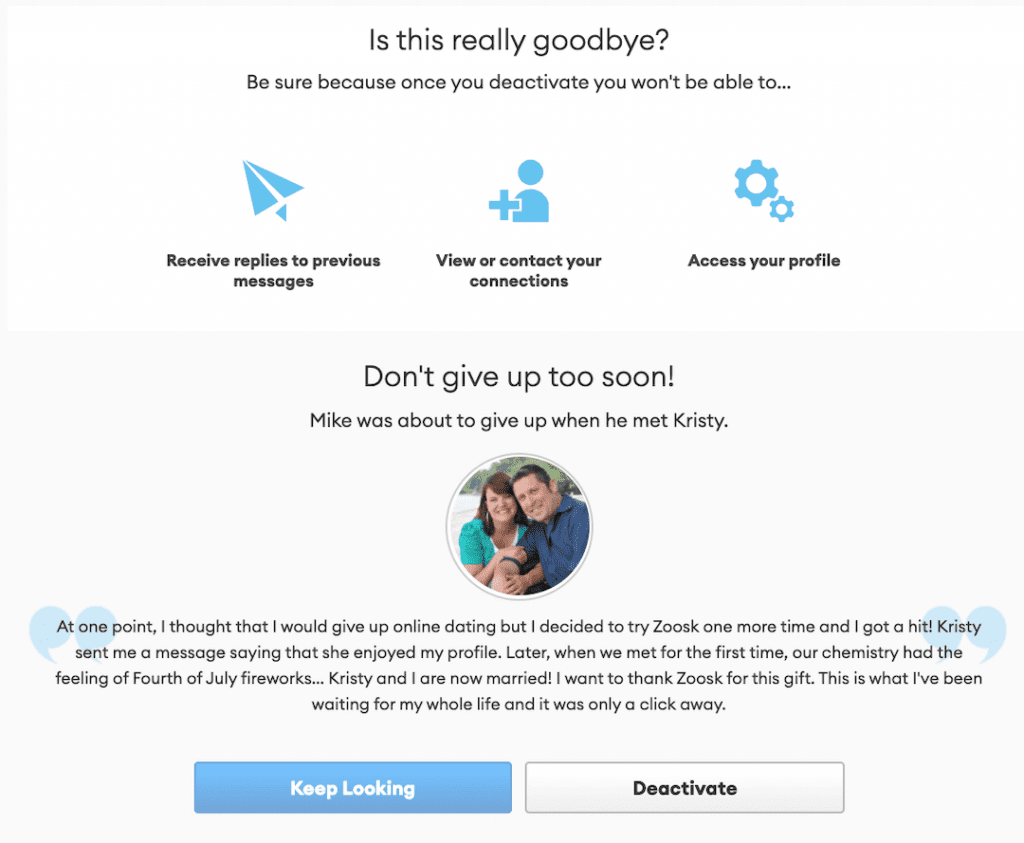
- Web (Desktop/Mobile Browser): Log in at zoosk.com → Settings → Account → Account Status → Deactivate Account → choose a reason → Continue Deactivation → Deactivate Account. Your profile disappears from search on Zoosk, but you can reactivate by logging in again.
- Android app: App → menu (≡) → gear icon → Account → Account Status → Deactivate → pick a reason → Continue. Same behavior as web.
Delete (iOS app): - iPhone/iPad: App → gear icon → Settings → Account → Account Status → Delete Account and follow the prompts. Deleting removes your profile details, messages, coins, and any remaining subscription benefits — this is designed to be final.
Want a confirmed, permanent wipe (any platform)?
If you don’t see “Delete” where you’re using Zoosk (e.g., web/Android), contact Zoosk Support and request permanent deletion of your account and data. They’ll confirm when the deletion’s processed.
Important: Don’t “overwrite your profile with gibberish.” That’s no longer necessary and can create confusion. Use Zoosk’s built-in Deactivate/Delete options and, if needed, a support deletion request for a complete removal.
Don’t Forget to Cancel Your Subscription
Deactivation or deletion doesn’t automatically stop billing.
- If you subscribed on Zoosk.com: Go to Settings → Subscription → Cancel Subscription to stop auto-renew.
- If you subscribed via Apple (iOS): manage or cancel in your Apple ID → Subscriptions.
If you subscribed via Google Play: cancel in your Google Play → Payments & Subscriptions.
Always keep the cancellation confirmation email for your records.
Deactivating Your Account from a Mobile Device
Prefer doing this on your phone? Here’s the quick run-through:
Android (Deactivate): Open Zoosk → menu (≡) → gear icon → Account → Account Status → Deactivate → follow the prompts.
iOS (Delete or Pause/Deactivate): Open Zoosk → gear icon → Settings → Account → Account Status → choose Delete Account, Pause, or Deactivate depending on your preference.
Tip: Major changes are usually smoother on desktop, but the in-app options above work fine.
Final Thoughts
It’s totally fine to take a break from online dating — just make sure you pause or deactivate so you don’t look active while you’re away. If you’re done for good, use Delete (on iOS) or request permanent deletion via support after deactivating on web or Android, and cancel any subscription where you purchased it (Zoosk.com, Apple, or Google). That way, your profile’s gone from view and your billing is properly stopped.
FAQ
Can I permanently delete my Zoosk account?
Yes. On iOS you can delete your account directly in the app (Settings → Account → Account Status → Delete). On web or Android, deactivate first, then contact Zoosk Support to confirm permanent deletion.
What’s the difference between Pause, Deactivate, and Delete?
Pause hides your profile temporarily. Deactivate removes it from view but allows you to return. Delete is permanent and removes your profile, messages, and benefits.
If I delete or deactivate, do I still get charged?
Account status changes don’t cancel billing. You must manually cancel your subscription where you purchased it — on Zoosk, Apple, or Google Play — to stop future payments.
How do I get Zoosk to delete my personal data?
Submit a permanent deletion request to Zoosk Support. Depending on your country or region, privacy laws (like GDPR or CCPA) may grant additional rights to data deletion.
Can I reactivate my account later?
If you paused or deactivated, yes — simply log back in. If you deleted, your data is gone and you’ll need to create a new account.
Will deactivation or deletion remove me from Google searches?
Deactivation removes your Zoosk profile, but search engines may take time to update. Permanent deletion plus time usually clears cached pages; you can also request removal through Google’s search tools.
